 LogQuill
Reviewing timesheets
Approve your team's timesheets, send them back with a reason, or hand one in for someone.
Who: a team's leader, for that team. Managers and administrators with Manage all timesheets, for every team.
What's waiting
- On your dashboard, the Waiting for your review widget.
- On the team's page, the Approvals tab: Waiting for review lists the timesheets handed in to the team, oldest first, whatever their period. Below it, Period shows where every member's timesheet stands for one period: Not yet approved and Approved.
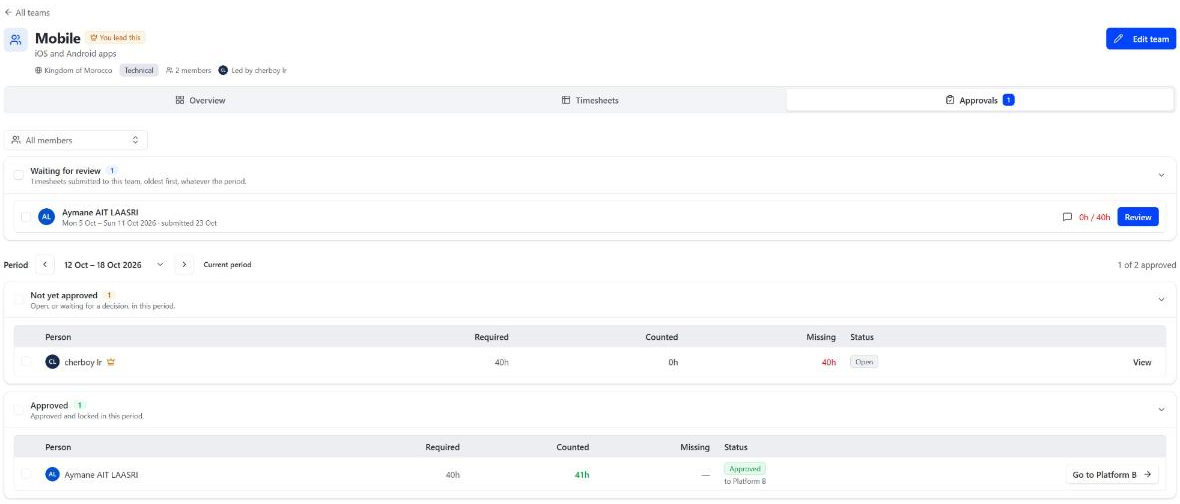
Review a timesheet
Choose Review on a timesheet. The dialog shows the person's time for the period day by day, against what was required, and their note.
- Approve, with an optional Comment. The period is then locked for them.
- Reject, with a Reason. The timesheet goes back to open so they can fix it and hand it in again. They see your reason.
- Reopen an approved timesheet, if something must change after all. It goes back to open.
- Submit on their behalf, when someone can't do it themselves.
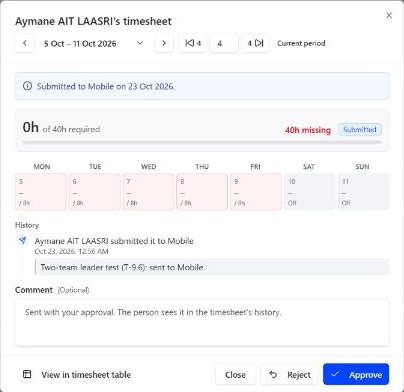
You can't approve, reject or reopen your own timesheet: a leader, manager or administrator above you does. Unless your site lets leaders review their own; see Timesheet settings.
When a timesheet can't be handed in
The Period section says why, next to the person:
- the period is still running;
- they're short of the required time, and incomplete timesheets aren't accepted;
- they lead this team and aren't a member of another one;
- they handed it in to another team, which reviews it;
- their role doesn't track time, or their Atlassian account was deactivated: nothing is expected.
The team's time
The Timesheets tab shows the team's time like your own Time Tracking page: every member, or one (Showing), for a period, with what each counted against what was required.
Time changed in Jira
If a worklog in a submitted or approved timesheet is added, edited or deleted directly in Jira (or by another app), LogQuill applies the change and flags the timesheet, listing what changed, so you can decide whether to reopen it.
The approval log
Who: people who manage all timesheets.
The Approval log tab lists every timesheet submitted to, approved or sent back by the team, with the reasons and notes. Filter it by action or period.