 LogQuill
Project settings
Who sees everyone's time on a Jira project, who sees its accounts and billable time, and who opens its project page.
Who: people with Project settings, the project's lead in Jira, and the project's admins in Jira.
Each Jira project has a LogQuill page with its time: in Jira, open the project, then Apps and LogQuill. These settings are for that page, and for the project's time wherever LogQuill shows it: who can open the page, who sees everyone's time on the project, and who sees its accounts and billable time.
Each Jira project can have its own LogQuill settings. Without them, a project uses the defaults: people see their own time and what their role allows, accounts and billable time are shown to everyone who can see the time, and the project page opens for everyone with the project in Jira.
Where to change them
- In Jira: open the project, then Project settings, Apps and LogQuill. This is where the project's admins and lead change them.
- In LogQuill: Admin, then Projects, lists every project with its own settings. LogQuill admins can change any project's there, or Set up a project to start one.
LogQuill admins can always see and change every project's settings.
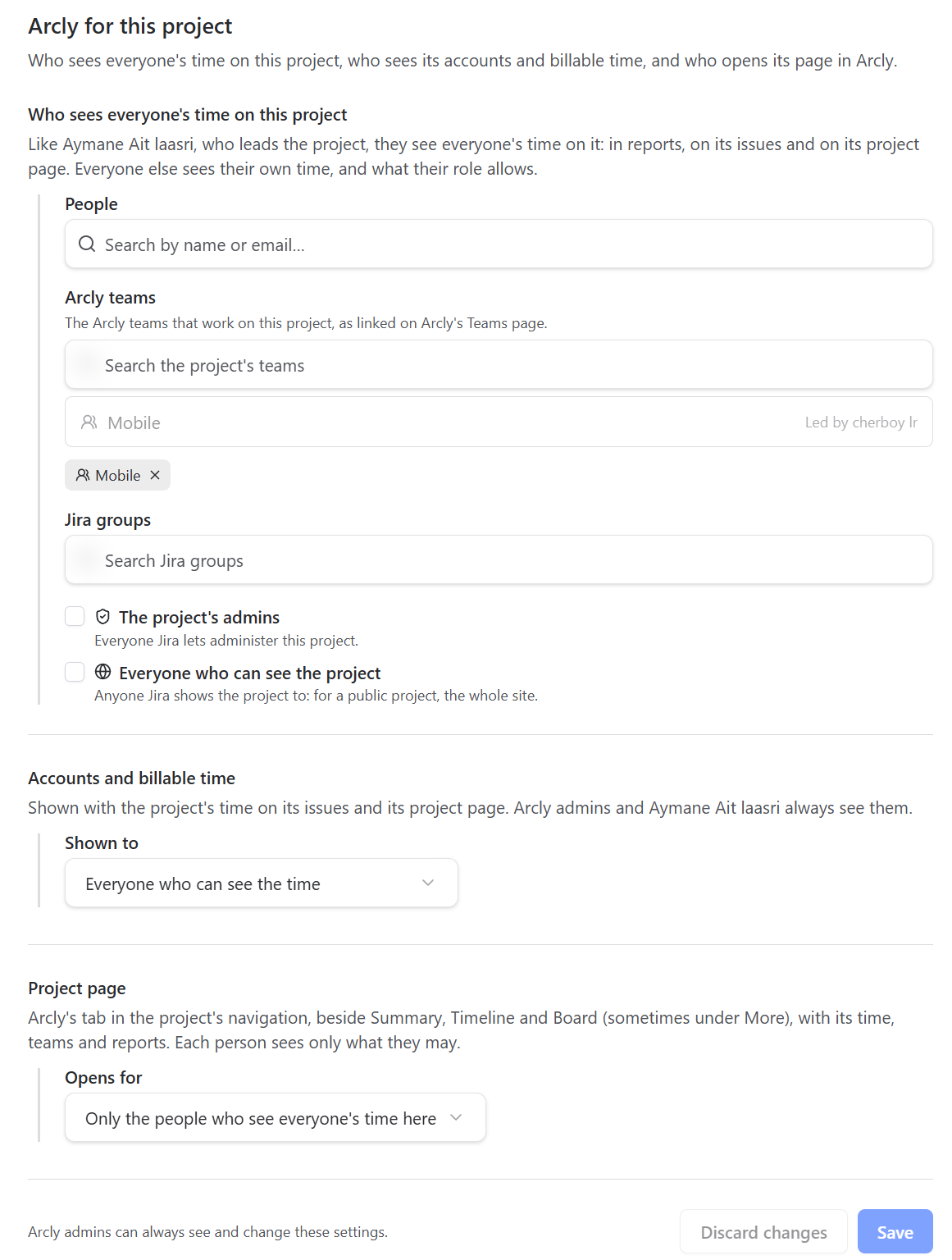
Who sees everyone's time on the project
The people on this list see everyone's time on the project, as its lead does: in reports, in LogQuill time and the worklogs panel on its issues, on its project page, and through the public API. Everyone else sees their own time, and what their role allows.
The list can hold:
- People.
- LogQuill teams: everyone on the team, leading it or not. Only the teams that work on the project are offered, each with who leads it: link a team to the project on the Teams page first.
- Jira groups: everyone in the group in Jira, nested groups included.
- The project's admins: everyone Jira lets administer the project.
- Everyone who can see the project: anyone Jira shows the project to. For a public project, that's the whole site.
Groups and the two ready-made entries are checked with Jira, as each person, and LogQuill remembers the answer for a few minutes: a change in Jira shows in LogQuill within about five minutes. Jira project roles (Developers, Members and the like) aren't offered, because Jira lets only a project's admins read who is in them.
Accounts and billable time
Shown with the project's time on its issues and on its project page. By default, to everyone who can see the time. Choose Only the people below to keep them to a list, which takes the same kinds of entries as the first one. LogQuill admins and the project's lead always see them.
Project page
The project page, LogQuill's tab in the project's navigation (beside Summary, Timeline and Board, or under More), with its time, teams and reports. By default it opens for everyone with the project in Jira, each person seeing only what they may. Choose Only the people who see everyone's time here to keep it to the first list.
History
Every change is in the audit log, under Admin: who changed which project's settings, and what was added or removed.
Screenshot to add: public/screenshots/administration/projects.png
Admin > Projects: the projects with their own LogQuill settings, each with a summary and a Change button.
In LogQuill, open Admin > Projects with two or three projects set up. Capture the list with its summaries and the Set up a project button.